In the flower trade, timing is everything. Products are fresh, availability changes quickly and decisions often have to be made the same day. When order information is spread across paper, Excel files and loose messages, noise creeps in at exactly the moments when speed and reliability matter most.
Digitizing trading processes is therefore not just about a new screen. It is about a workable system in which product data, orders, price agreements, transport, quality checks and forecasts come together. The Equaflor case shows what such a step can look like in a process that used to lean on paper and Excel.
In this article we translate that practice into broader lessons for teams that want to professionalize their order planning without bringing daily operations to a halt.

Flowers on a work floor, as context for fast order planning and up-to-date trading information.
Why paper and Excel become fragile in daily trading
Excel is often a logical start. It is flexible, everyone knows it and you can quickly set up a planning or order list in it. Paper also works as long as the number of handovers stays limited. But in a trading environment with many changes, the weak spots appear quickly.
The biggest problems are usually not in one wrong file. They arise from the combination of speed, dependencies and several people who need information at the same time.
- Versions drift apart. An order may have been changed in one file while a colleague is still working with an older export.
- Context gets separated from the data. Price agreements, transport details and quality notes are not always kept with the same order.
- Checks come too late. Errors only become visible at shipping, invoicing or customer contact.
- Planning depends on individuals. A lot of knowledge sits in the heads of experienced employees rather than in the process.
That does not mean Excel is wrong. It does mean that at a certain point Excel should no longer be the central source. In the article from paper and Excel to an order platform we describe that tipping point more broadly. In the flower trade, it is above all the combination of perishability, price pressure and daily logistics that decides it.
Central product and order data as the foundation
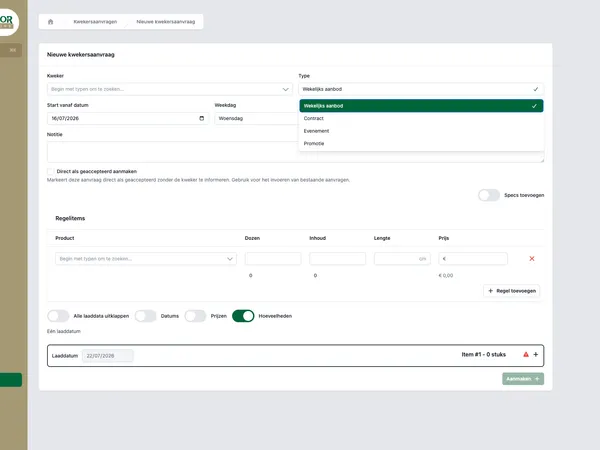
Real-time order planning starts with one shared foundation. Not because everything has to become more complicated, but because teams need the same truth. A central web application can bring together product information, orders, price agreements, carriers, shipments, quality checks and forecasts.
The value lies in how it all connects. An order is not just a line with quantities. It comes with products, agreements, delivery moments, transport choices and checkpoints. When that data is linked, the system can help divide work better and spot deviations sooner.
What belongs in the central system?
- Product data. Think of variety, quality, availability and the characteristics that matter for sales and planning.
- Order data. Quantities, customer agreements, statuses and changes should be found in one place.
- Price agreements. Teams need to know which agreements apply without searching through separate documents.
- Transport and shipments. Planning gets stronger when logistics information is linked to the order flow.
- Quality checks. Inspection data should not disappear into notes, but be part of the process.
- Forecasts. Expectations help align capacity, purchasing and sales.
The result is a system that depends less on manual handovers. Employees spend less time searching, enter less data twice and guess less about which information is current.

A laptop with dashboards, illustrating real-time insight into orders, planning and trading data.
Roles and permissions bring calm to the process
When digitizing, much of the attention goes to features: entering orders, managing tasks, recording checks, viewing dashboards. At least as important is the question of who is allowed to do what. In trading processes you want to prevent everyone from being able to change everything, especially where price agreements, shipments and quality information come together.
Role-based access, often called RBAC, helps translate responsibilities into the system. A sales employee needs different permissions than someone who plans transport or carries out quality checks. That makes the application not only more secure, but also calmer to use.
Practical benefits of roles and permissions
- Less risk of wrong changes. People only see and change what belongs to their work.
- Clearer responsibility. Status changes and checks match concrete roles in the process.
- Better adoption. Users get screens and actions that fit their daily tasks.
- Scalability. New employees or teams can be added faster, without one-off exceptions.
For custom applications this is not a detail to sort out afterwards. It belongs in the design of the process. You can read more about the topic in RBAC, roles and permissions in custom web applications.
Dashboards only help when they support decisions
A real-time dashboard is not a collection of charts for the wall. It has to answer operational questions. Which orders need attention? Where are the bottlenecks in planning or transport? Which quality checks have not been completed yet? Which forecasts deviate from the current situation?
That is why a good dashboard does not start with visualization, but with decisions. Who looks at it, when, and what should that person be able to do next?
Examples of useful dashboard questions
- Which orders are not yet complete for shipping?
- Which products need an extra quality check?
- Which shipments are at risk of delay?
- Which price agreements or customer agreements need attention?
- Where does the current planning deviate from the forecast?
When these questions can be answered directly from central data, a large part of the manual checking work disappears. The team spends less time gathering information and can adjust course faster. In replacing Excel with a real-time dashboard we go deeper into the difference between reporting after the fact and steering on current data.

Flowers ready for processing in a logistics chain from grower to customer.
Recording quality checks digitally prevents loose ends
In the flower trade, quality is not an administrative side issue. It affects customer satisfaction, planning, price agreements and follow-up actions. When checks are on paper or in loose notes, it is hard to reconstruct afterwards what was seen, who did the check and which order or shipment it belonged to.
By making quality checks part of the digital process, the information becomes usable at the moment it matters. A check can be linked to a product, order or shipment. Deviations can become visible straight away to the right role. And when problems recur, you build up data you can use to improve your processes.
That does not have to be heavy. Start with the checks that have the most effect on daily decisions. Record what is minimally needed to be able to take action. Then expand where practice calls for it.
How to start digitizing without disrupting operations
The biggest mistake in process digitization is trying to replace everything at once. Especially in trading, the system has to grow with the reality on the work floor. A good approach therefore starts small enough to stay manageable, but concrete enough to deliver value straight away.
- Map the current order flow, from product information to shipping and checks.
- Determine where errors, delays or duplicate work occur most often.
- Choose which data has to be central before you add dashboards or automation.
- Design roles and permissions based on the real responsibilities in the team.
- Start with one core process, for example order entry, shipments or quality control.
- Measure whether employees need to search less, enter less data twice and can decide faster.
The lesson from digitization in the flower trade is clear: technology only works when the process becomes calmer because of it. Not more screens, but better coherence. Not more loose exports, but one up-to-date foundation for planning, execution and control.
Want to explore how this could work for your trading process? Then get in touch with House of Devs. We think along about the process side, the data model and the custom application your team really needs.