
Case study
Custom Camera Management Platform for Ciekeboe
From the first camera on a construction site to the final invoice: Ciekeboe runs its entire rental process in one web application. Faults report themselves, the control room gets a consistent handover and customers follow along in a portal of their own.
Last updated:

Written by Emiel Molenaar · Co-founder, developer
- Client
- Ciekeboe
- Year
- - ongoing
- Service
- Custom platform for construction site camera security
The client
Ciekeboe rents out security cameras for construction sites. An installation is more than a camera: it sits on a mast, with a router and often with its own power supply, because a construction site does not always have mains power. A control room watches along and responds to alarms.
The challenge
Ciekeboe had no central place for all of those parts. Customers, locations and cameras were tracked in different places, and communication about planning, faults, the control room and invoices was scattered. Whether a camera still worked only became clear when someone went to look. Ciekeboe wanted one platform for its own team and its customers alike.
The solution
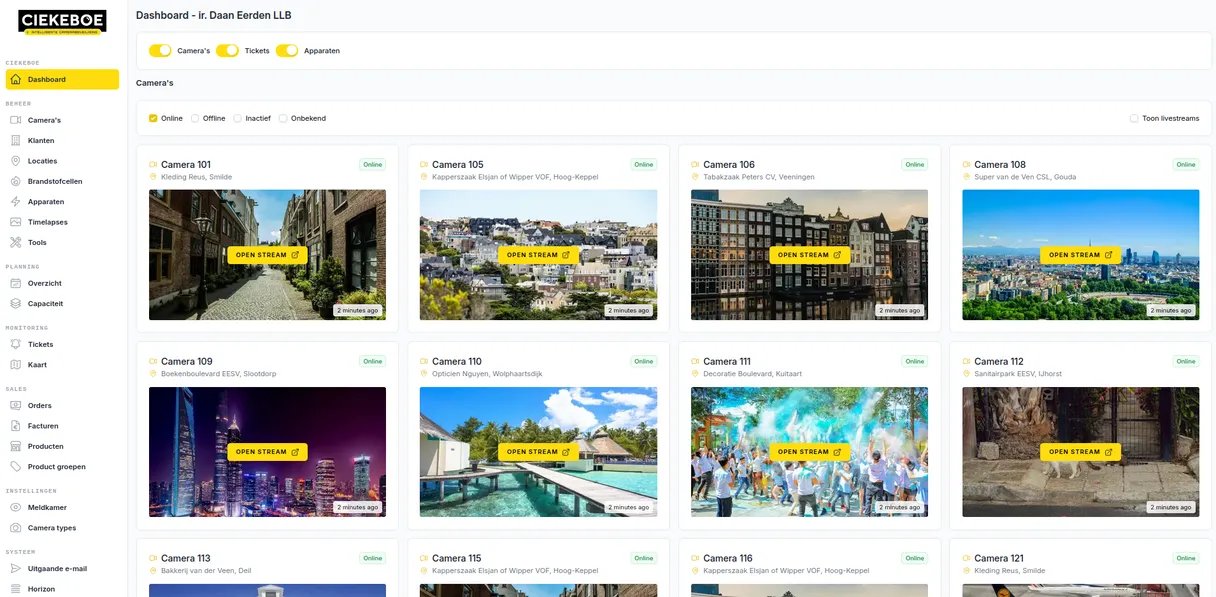
Since 2023 we have been building a web application for Ciekeboe that runs the whole life cycle of a camera on a construction site: placing it, monitoring it, handing it over to the control room and invoicing it. The platform keeps growing with the business.
Managing cameras from the browser
Registering a new camera takes a few fields: a name, its network address, the type and the location. From there the platform takes over. It reads the hardware details, fetches the video channels and puts the camera on the map. Every camera is checked continuously, and an up to date snapshot shows whether the view is still right.
From the browser, staff pan, tilt and zoom a camera, or jump to a saved viewing angle with one click. The hardware on site is remote controlled as well: raise or lower the mast, open the access door, switch energy saving mode on or off, or restart.
Watching live and reviewing events
Live video runs through a dedicated media server, with a short lived access token per viewer. For a client who wants to follow progress, Ciekeboe creates a public link that needs no account. When a camera detects something, such as a person entering a zone, the platform fetches the recording and converts it into a video that plays in any browser. Cameras with a people counter record how many people walk in and out each hour, with an Excel export Ciekeboe can hand to the customer.
Timelapses
Each camera runs one or more timelapses, each with its own interval. They only capture frames during the site’s working hours, so the video holds no empty nights or weekends. Every day becomes a clip of its own, and every night the clips are joined into one video of the whole project.
Power and location
Many installations run on a fuel cell or solar panels. The platform reads the charge, the voltage and any error codes, controls the fuel cell remotely and records when a cartridge was replaced. One overview lists every installation with its power status, so a site that is running low stands out at once. The position comes from the installation’s GPS, and every camera is shown on a live map.
Faults report themselves
When a camera goes offline, a memory card is missing, power drops out or a fuel cell reports an error, the platform opens a ticket on its own. Templates and rules decide who gets the ticket and at what priority, and the right people are notified by email or text message. Once the problem is solved, the ticket closes itself.
Handover to the control room
Each location has a fixed schedule for when the control room is watching: around the clock, outside working hours only, or on a schedule of its own. The cameras switch their detection on and off accordingly. For a new location the platform prepares the handover to the control room, with the address, the cameras and instructions, and tracks whether the control room has confirmed it.
From placement to invoice
As soon as a camera is placed at a location, an order is created. When it is removed, the order gets an end date. The platform works out when to invoice, aligns the invoices of locations within one project and prepares them in MoneyBird. Customers who want to approve invoices first do so through a secure link, where they can also add a purchase order number. Customer details stay in sync with MoneyBird and Gripp.
A portal for customers
Customer contacts log in to the same platform and only see their own locations and cameras. They watch live, view recordings and timelapses, and switch devices at their location. Those given the right can also open the access door or raise the mast themselves. The platform installs as an app on a phone, so it is at hand on site too.
The result
Ciekeboe has one place for all of its work. Faults are found before a customer or the control room notices them, invoices follow from what is actually on site and customers no longer need to call to know how their site is doing. That lets Ciekeboe serve more locations without its team having to grow at the same pace.
What we did
- Remote camera control
- Live streams and event recordings
- Automatic timelapses
- Fuel cell and solar power monitoring
- Live map of every installation
- Faults that report and close themselves
- Control room handover
- Invoicing through MoneyBird
- Customer portal per location
This platform allows us to serve our customers faster and more effectively, while preparing for future growth. Everything we need is now streamlined in one place, saving time and minimizing mistakes.

- Manual administrative tasks
- -90%
- Camera events processed per year
- 50,000+
- Minutes of video processed
- 10M+