In B2B sales, a price is rarely one fixed amount. One customer gets contract prices, a distributor works with volume discounts and a regular customer group has its own terms. On top of that come quotes, order lines, exceptions and sometimes manual approval.
That works fine for a long time in spreadsheets, loose notes and manual checks. Until several people start changing prices, a quote is copied over incorrectly or an order no longer matches the agreement with the customer. At that point price list management is no longer an administrative task, but a risk in your operation.
Good software makes price agreements explicit. Not just as a table of amounts, but as part of the entire process: customer management, quotes, orders, documents, reports and integrations with a webshop or back office.

A team discusses customer agreements, pricing rules and order processes at a table.
Why price list management in B2B quickly becomes complex
In consumer sales, the pricing structure is often straightforward: one product, one current price, possibly a temporary promotion. B2B works differently. The price regularly depends on the customer, customer group, contract agreement, tiered pricing, product category or validity period.
The complexity is not only in the pricing rule itself. The problem mainly arises when that rule is used in several places. Think of a quote that must show the same price as the order, a document that is generated automatically, or a report that must show margin and revenue correctly.
Common signs that price list management is ready for better software:
- Employees look up customer prices in several Excel files.
- Quotes are built by hand and then entered again as an order.
- Exception agreements live in email, notes or personal folders.
- Nobody knows for sure which price is leading when systems differ.
- Price changes are hard to trace or check.
- Reports take a lot of correction work because order data is inconsistent.
These are not minor inconveniences. When prices don’t flow reliably through the process, you get discussions with customers, repair work for sales and finance, and less control over margin.
The core: one place for price agreements
Price list management becomes manageable when you record price agreements centrally and reuse that data in the rest of the process. That doesn’t mean everything has to disappear into one big system. It does mean there is one clear source for the question: which price applies to this customer, this product and this context?
A practical setup usually contains these parts:
- Customer prices: specific agreements at customer level.
- Customer groups: price agreements for segments, such as dealers, distributors or fixed contract groups.
- Product linking: prices linked to products, product groups or variants.
- Validity: start date, end date and status of a pricing rule.
- Priority: rules for what takes precedence when several agreements apply.
- Approval: checks on exceptions, discounts or deviations outside agreed margins.
For teams, that priority is especially important. If a customer belongs to a customer group but also has an agreement of its own, the software must predictably determine which price applies. Without that logic, control shifts to individual employees. That makes the process fragile.

A laptop shows dashboards used to analyze pricing rules and sales data.
From price list to quote and order
A price list only has value if it carries through properly into the daily workflow. In many organizations the sales process starts with a quote. That is where the right customer price must be available immediately, including exceptions or validity dates. Once the quote is accepted, the same price must come back in the order.
A good flow prevents employees from having to retype prices. The software can, for example, build a quote automatically from the customer, products and quantities. Order lines are then filled from the same data. That reduces the chance of differences between the quote, order confirmation and internal administration.
In custom back-office software you can tailor that flow to how your organization really works:
- Select the customer or customer group.
- Fetch the valid price agreements.
- Show only relevant products or terms.
- Calculate order lines based on quantities, agreements and exceptions.
- Flag deviations that need approval.
- Use the same data for documents, order management and reports.
This is also where custom software makes the difference. Standard software can do a lot, but doesn’t always fit specific pricing logic, exception flows or document requirements. If price agreements determine your margin and customer relationships, you want the software to support the process instead of the other way round.
Approval, control and auditability
Prices change. Customers get new agreements. Sales sometimes wants to deviate from the standard. That doesn’t have to be a problem, as long as it is clear who changes something, why it happens and from when the change applies.
That is why price list management shouldn’t only be about input fields. It must also be verifiable. Think of change history, roles and permissions, approval steps and clear statuses. That prevents anyone from changing pricing rules without context.
Practical checkpoints are:
- who created or changed a pricing rule;
- which previous value was overwritten;
- from which date the new agreement is active;
- whether a deviation was approved;
- which quote or order was affected by a pricing rule;
- which prices were passed on to external systems.
This doesn’t only help prevent errors. It also makes discussions afterwards easier. When a customer asks why a certain price was used, the team can go back to the agreement and the order context instead of searching through loose files.

An employee uses software to check customer prices, quotes and sales agreements.
Integrations with a webshop, ERP or back office
Price list management rarely stands on its own. Prices are used in a webshop, ERP, order platform, contract module or back office. The question then is not only where you manage prices, but also how they are exchanged reliably.
Three things matter in an integration. First, it must be clear which system is leading. Second, synchronization must be predictable, for example in real time or at fixed moments. Third, errors must become visible, so that a failed update doesn’t quietly lead to wrong prices.
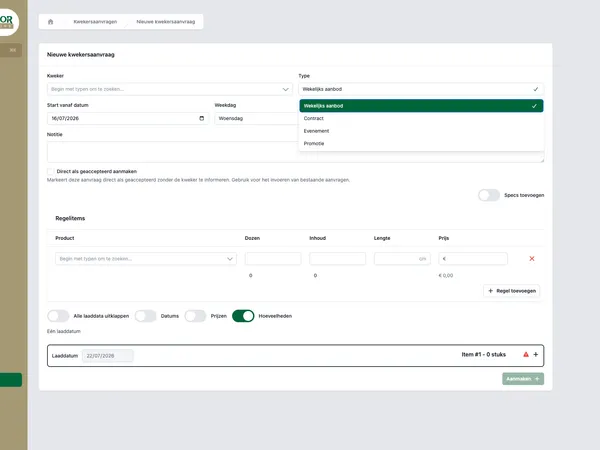
In the BirdBlocker case this kind of back-office question comes up concretely. There, custom software covers price list management per customer or customer group, order management, quotes, customer management, document automation and reporting, among other things. It shows well that price management is part of a broader operational chain.
The Tulpen.nl case also touches on this topic. There, product linking is combined with automatic price calculation in contracts. That is exactly the kind of logic that becomes difficult when agreements are spread across documents and manual calculations.
When do you need custom software?
Not every company needs custom software for price list management. If you have a limited product range, few customer agreements and a standard sales process, existing software can fit perfectly well. Custom software becomes interesting when pricing logic is a distinctive or business-critical part of your process.
Consider custom software when one or more of these situations sound familiar:
- prices structurally differ per customer or customer group;
- quotes and orders contain many exceptions;
- manual checks slow down the sales process;
- pricing errors lead to lost margin or repair work;
- documents are filled with price information by hand;
- reports depend on corrections afterwards;
- the integration between webshop, ERP and back office needs specific logic.
House of Devs builds software for process questions like these. Not by bending a standard package to fit with workarounds, but by first getting the process clear. Which pricing rules are there? Where do errors occur? Which teams use the data? Which systems need to be connected?
Want to look more broadly at this type of process improvement? Then also read how we approach automating business processes and the step from paper and Excel to an order platform.
How to tackle price list management in practice
A good project doesn’t start with drawing screens. It starts with getting clear on how prices come about today and where things go wrong. Then you can decide which logic belongs in software and which exceptions deliberately stay manual.
A practical approach:
- Map customer types, customer groups and exceptions.
- Decide which pricing rules are leading in case of conflicts.
- Link pricing rules to quotes, orders and documents.
- Define who may change prices and who must approve.
- Make error messages and synchronization status visible.
- Test with real customer agreements before you scale up.
That way you avoid building just a digital version of a messy spreadsheet. The goal is not more fields, but more control: less double entry, fewer pricing errors and a process in which sales, finance and operations look at the same agreements.
Want to explore whether custom price list management fits your process? Get in touch with House of Devs. Together we’ll look at where price agreements get stuck today and which software step makes sense.